The machine imx6ul-pico-hobbit is now supported in the Yocto Project!
The imx6ul-pico-hobbit board is defined by TechNexion here and by Wandboard.org here
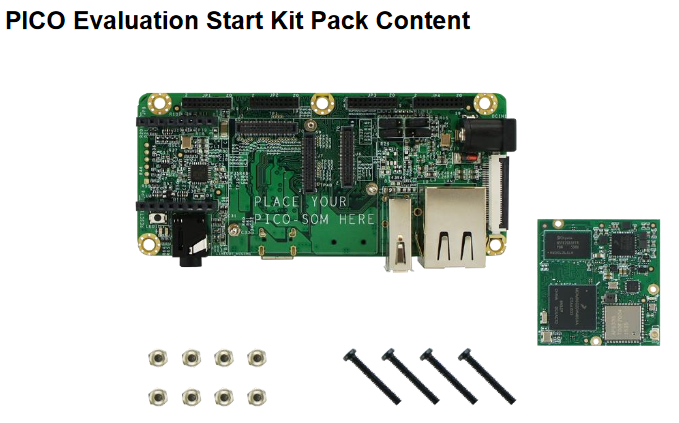
It is supported by Yocto Project in meta-fsl-arm-extra meta-layer. The commit adding it is:
https://github.com/Freescale/meta-fsl-arm-extra/commit/089ce85e2e2dd78e45b773b947643ab8f4e2b965
In kernel.org, the commit adding it is:
In U-Boot the commit adding it is:
http://git.denx.de/?p=u-boot.git;a=commit;h=69cc7dbf1f62492788ab810db7d8444a623c23c2
How to update (or copy) the software
u-boot
1
2
3
4
5
$ export ARCH=arm
$ export CROSS_COMPILE=arm-xxxx
$ make mrproper
$ make pico-imx6ul_defconfig
$ make
kernel
1
2
3
4
5
6
$ export ARCH=arm
$ export CROSS_COMPILE=arm-xxxx
$ make clean
$ make imx_v6_v7_defconfig
$ make -jN (where N is the number of cores of your host PC)
$ make imx6ul-pico-hobbit.dtb
Yocto Project
Add MACHINE="imx6ul-pico-hobbit" in your <build-dir>/conf/local.conf file and make the image (of your choice)
Loading
- Go to serial download mode
See how on “4.1.3 Changing Hobbitboard boot mode” from here. Unfortunately it’s a PDF and there is no possible cross reference to the exact section
- Using imx_usb, load the (2016.05) u-boot
1
$ sudo ./imx_usb u-boot.imx
- In the board, turn on the UMS utility (connected via serial cable)
1
> ums 0 mmc 0
- In the PC (connected via USB cable) you can now see the partitions mounted like an SDCard.
1
2
$ umount /media/user/*
$ sudo dd if=u-boot.imx of=/dev/sdX bs=1K seek=1
- or use the image.sdcard generated by BitBake:
1
$ sudo dd if=image.sdcard of=/dev/sdX
- Turn off, go to eMMC boot, turn on
See how on “4.1.3 Changing Hobbitboard boot mode” from here. Unfortunately it’s a PDF and there is no possible cross reference to the exact section
This post was originally posted on i.MXDev Blog.